Showing posts with label Scan. Show all posts

Friday, 28 February 2014

[IronWASP v0.9.7.5] Open Source Advanced Web Security Testing Platform


IronWASP (Iron Web application Advanced Security testing Platform) is an open source system for web application vulnerability testing. It is designed to be customizable to the extent where users can create their own custom security scanners using it. Though an advanced user with Python/Ruby scripting expertise would be able to make full use of the platform, a lot of the tool's features are simple enough to be used by absolute beginners. 

IronWASP has a plugin system that supports Python and Ruby. The version of Python and Ruby used in IronWASP is IronPython and IronRuby which is syntactically similar to CPython and CRuby. However some of the standard libraries might not be available, instead plugin authors can make use of the powerful IronWASP API. 

One of the design goals of IronWASP is to be usable without reading a documentation. So whether you want to use the UI or do awesome things in the scripting shell, you can dive right in.

The UI has a clean design with helpful wizards for complex tasks, small snippets of text descriptions in different sections and 'Help' sections all over the tool that provide contextual documentation when required.

If you want to do scripting then make use of the 'Script Creation Assistant' that can take you requirement and create the script automatically for you. You could be someone who is trying to learn scripting or an experienced scripting ninja, you will find this feature to be extremly useful.

If you want to create a new vulnerabilty check or write your own security tool in the shortest possible time using the powerful API of IronWASP then use the 'Coding Assistants' available in the 'Dev Tools' menu.

Thursday, 20 February 2014

[IPNetInfo v1.53] Retrieves IP Address Information


IPNetInfo is a small utility that allows you to easily find all available information about an IP address: The owner of the IP address, the country/state name, IP addresses range, contact information (address, phone, fax, and email), and more.

This utility can be very useful for finding the origin of unsolicited mail. You can simply copy the message headers from your email software and paste them into IPNetInfo utility. IPNetInfo automatically extracts all IP addresses from the message headers, and displays the information about these IP addresses. 

Sunday, 16 February 2014

[pMap v1.10] Passive Discovery, Scanning, and Fingerprinting


Discovery, Scanning, and Fingerprinting via Broadcast and Multicast Traffic

Features
  • Reveals open TCP and UDP ports
  • Uses UDP, mDNS, and SSDP to identify PCs, NAS, Printers, Phones, Tablets, CCTV, DVR, and Others
    • Device Type, Make, and Model
    • Operating Systems and Version
    • Service Versions and Configuration
  • Stand-Alone (Nmap-like output) or Agent Mode (SYSLOG)
  • Metasploit Script Included

Saturday, 8 February 2014

[Rootkit Hunter] Scanning tool to ensure you for about 99.9%* you're clean of nasty tools


Rootkit scanner is scanning tool to ensure you for about 99.9%* you're clean of nasty tools. This tool scans for rootkits, backdoors and local exploits by running tests like:


- MD5 hash compare
- Look for default files used by rootkits
- Wrong file permissions for binaries
- Look for suspected strings in LKM and KLD modules
- Look for hidden files
- Optional scan within plaintext and binary files

Rootkit Hunter is released as GPL licensed project and free for everyone to use.

* No, not really 99.9%.. It's just another security layer 

System requirements:
- Compatible operating system (see 'Supported operating systems')
- Bourne Again Shell (BASH)

Monday, 20 January 2014

[Fing] Tool for Network Scan and Analysis for iPhone


Highlight of features: 
+ Discovers all devices connected to a Wi-Fi network. No limitation! 
+ Displays the MAC Address and up-to-date Vendor names. 
+ Customize names, icons and notes. 
+ Wake On LAN. Switch on your cable-connected devices.
+ History of all discovered networks. You can review and edit your past scans at any time, also offline. 
+ Checks the availability of Internet connection, reporting the geographic location of the ISP (Internet Service Provider). 
+ Share a detailed report of any scan via email
+ Search devices by IP, MAC, Name, Vendor and Notes
+ In-app settings
+ Scans the open ports to find available services. It uses a fast engine that supports hundreds of well-known ports, that you can customize with your own
+ Translates IP addresses to its Domain Names, and reverse 
+ Works also with hosts outside your local network
+ Tracks when a device has gone UP or DOWN, keeping disconnected devices in the list.
+ Discovers NetBIOS names.
+ Supports identification by IP address. Allows to customize nodes hidden behind a network switch.
+ Can sort devices by IP, MAC, Name, Vendor, State, Last Change.
+ Free of charge, Free of Ads 
+ Integrates with Fingbox to sync and backup your customizations, merge networks with multiple access points, monitor remote networks via Fingbox Sentinels, get notifications of changes, and much more.

Fing is born from the ashes of the famous Look@LAN, with a brand-new engine that makes it even faster and smarter! Available also for Windows, Mac OS X, Linux and more platforms!

Monday, 13 January 2014

[Vega v1.0 Build 108] Web Security Scanner


Vega is a free and open source scanner and testing platform to test the security of web applications. Vega can help you find and validate SQL Injection, Cross-Site Scripting (XSS), inadvertently disclosed sensitive information, and other vulnerabilities. It is written in Java, GUI based, and runs on Linux, OS X, and Windows

Vega includes an automated scanner for quick tests and an intercepting proxy for tactical inspection. The Vega scanner finds XSS (cross-site scripting), SQL injection, and other vulnerabilities. Vega can be extended using a powerful API in the language of the web: Javascript.


 Features

  • Automated Crawler and Vulnerability Scanner
  • Consistent UI
  • Website Crawler
  • Intercepting Proxy
  • SSL MITM
  • Content Analysis
  • Extensibility through a Powerful Javascript Module API
  • Customizable alerts
  • Database and Shared Data Model
Some of the features in the 1.0 release include:
  • Active proxy scanner
  • Greatly improved detections
  • Greatly improved support for authenticated scanning
  • API enhancements
  • HTTP message viewer enhancements

Modules

  • Cross Site Scripting (XSS)
  • SQL Injection
  • Directory Traversal
  • URL Injection
  • Error Detection
  • File Uploads
  • Sensitive Data Discovery

Tuesday, 31 December 2013

[flunym0us] Vulnerability Scanner for Wordpress and Moodle


Flunym0us is a Vulnerability Scanner for Wordpress and Moodle designed by Flu Project Team.

Flunym0us has been developed in Python. Flunym0us performs dictionary attacks against Web sites. By default, Flunym0us includes a dictionary for Wordpress and other for Moodle.

Operation

Flunym0us requires python.
Arguments allowed:
-h, --help: Show this help message and exit
-wp, --wordpress: Scan WordPress site
-mo, --moodle: Scan Moodle site
-H HOST, --host HOST: Website to be scanned
-w WORDLIST, --wordlist WORDLIST: Path to the wordlist to use
-t TIMEOUT, --timeout TIMEOUT: Connection timeout
-r RETRIES, --retries RETRIES: Connection retries
-p PROCESS, --process PROCESS: Number of process to use
-T THREADS, --threads THREADS: Number of threads (per process) to use

Versions

Flunym0us is distributed under the terms of GPLv3 license
ChangeLog 1.0:
[+] Search Wordpress Plugins
[+] Search Moodle Extensions
ChangeLog 2.0:
[+] http user-agent hijacking
[+] http referer hijacking
[+] Search Wordpress Version
[+] Search Wordpress Latest Version
[+] Search Version of Wordpress Plugins
[+] Search Latest Version of Wordpress Plugins
[+] Search Path Disclosure Vulnerabilities
[+] Search Wordpress Authors  

Wednesday, 4 December 2013

[Wapiti 2.3.0] Web Application Vulnerability Scanner

Wapiti allows you to audit the security of your web applications.

It performs "black-box" scans, i.e. it does not study the source code of the application but will scans the webpages of the deployed webapp, looking for scripts and forms where it can inject data.

Once it gets this list, Wapiti acts like a fuzzer, injecting payloads to see if a script is vulnerable.


Wapiti can detect the following vulnerabilities :
  • File disclosure (Local and remote include/require, fopen, readfile...)
  • Database Injection (PHP/JSP/ASP SQL Injections and XPath Injections)
  • XSS (Cross Site Scripting) injection (reflected and permanent)
  • Command Execution detection (eval(), system(), passtru()...)
  • CRLF Injection (HTTP Response Splitting, session fixation...)
  • XXE (XmleXternal Entity) injection
  • Use of know potentially dangerous files (thanks to the Nikto database)
  • Weak .htaccess configurations that can be bypassed
  • Presence of backup files giving sensitive information (source code disclosure)
Wapiti supports both GET and POST HTTP methods for attacks.
It also supports multipart and can inject payloads in filenames (upload).
Display a warning when an anomaly is found (for example 500 errors and timeouts)
Makes the difference beetween permanent and reflected XSS vulnerabilities.

General features :
  • Generates vulnerability reports in various formats (HTML, XML, JSON, TXT...)
  • Can suspend and resume a scan or an attack
  • Can give you colors in the terminal to highlight vulnerabilities
  • Different levels of verbosity
  • Fast and easy way to activate/deactivate attack modules
  • Adding a payload can be as easy as adding a line to a text file
Browsing features

  • Support HTTP and HTTPS proxies
  • Authentication via several methods : Basic, Digest, Kerberos or NTLM
  • Ability to restrain the scope of the scan (domain, folder, webpage)
  • Automatic removal of a parameter in URLs
  • Safeguards against scan endless-loops (max number of values for a parameter)
  • Possibility to set the first URLs to explore (even if not in scope)
  • Can exclude some URLs of the scan and attacks (eg: logout URL)
  • Import of cookies (get them with the wapiti-cookie and wapiti-getcookie tools)
  • Can activate / deactivate SSL certificates verification
  • Extract URLs from Flash SWF files
  • Try to extract URLs from javascript (very basic JS interpreter)
  • HTML5 aware (understand recent HTML tags)
  • Wapiti is a command-line application.

    Here is an exemple of output against a vulnerable web application.
    You may find some useful informations in the README and the INSTALL files.

    [ike-scan] Discover & Fingerprint IKE Hosts (IPsec VPN Servers)


    ike-scan discovers IKE hosts and can also fingerprint them using the retransmission backoff pattern.
    ike-scan can perform the following functions:
    • Discovery Determine which hosts in a given IP range are running IKE. This is done by displaying those hosts which respond to the IKE requests sent by ike-scan.
    • Fingerprinting Determine which IKE implementation the hosts are using, and in some cases determine the version of software that they are running. This is done in two ways: firstly by UDP backoff fingerprinting which involves recording the times of the IKE response packets from the target hosts and comparing the observed retransmission backoff pattern against known patterns; and secondly by Vendor ID fingerprinting which compares Vendor ID payloads from the VPN servers against known vendor id patterns.
    • Transform Enumeration Find which transform attributes are supported by the VPN server for IKE Phase-1 (e.g. encryption algorithm, hash algorithm etc.).
    • User Enumeration For some VPN systems, discover valid VPN usernames.
    • Pre-Shared Key Cracking Perform offline dictionary or brute-force password cracking for IKE Aggressive Mode with Pre-Shared Key authentication. This uses ike-scan to obtain the hash and other parameters, and psk-crack (which is part of the ike-scan package) to perform the cracking.
    The retransmission backoff fingerprinting concept is discussed in more detail in the UDP backoff fingerprinting paper which should be included in the ike-scan kit as UDP Backoff Fingerprinting Paper.


    The program sends IKE phase-1 (Main Mode or Aggressive Mode) requests to the specified hosts and displays any responses that are received. It handles retry and retransmission with backoff to cope with packet loss. It also limits the amount of bandwidth used by the outbound IKE packets.
    IKE is the Internet Key Exchange protocol which is the key exchange and authentication mechanism used by IPsec. Just about all modern VPN systems implement IPsec, and the vast majority of IPsec VPNs use IKE for key exchange. Main Mode is one of the modes defined for phase-1 of the IKE exchange (the other defined mode is aggressive mode). RFC 2409 section 5 specifies that main mode must be implemented, therefore all IKE implementations can be expected to support main mode. Many also support Aggressive Mode.
    Building and Installing
    • Run git clone https://github.com/royhills/ike-scan.git to obtain the project source code
    • Run cd ike-scan to enter source directory
    • Run autoreconf --install to generate a viable ./configure file
    • Run ./configure or ./configure --with-openssl to use the OpenSSL libraries
    • Run make to build the project
    • Run make check to verify that everything works as expected
    • Run make install to install (you’ll need root or sudo for this part)

    Wednesday, 13 November 2013

    [WebSurgery] Web application security testing suite


    WebSurgery is a suite of tools for security testing of web applications. It was designed for security auditors to help them with web application planning and exploitation. Suite currently contains a spectrum of efficient, fast and stable web tools (Crawler, Bruteforcer, Fuzzer, Proxy, Editor) and some extra functionality tools (Scripting Filters, List Generator, External Proxy).


    Main Tools
    Crawler
    • High Performance Multi-Threading and Completely Parameterized Crawler
    • Extracts Links from HTML / CSS / JavaScript / AJAX / XHR
    • Hidden Structure Identification with Embedded Bruteforcer
    • Parameterized Timing Settings (Timeout, Threading, Max Data Size, Retries)
    • Parameterized Limit Rules (Case Sensitive, Process Above / Below, Dir Depth, Max Same File / Script Parameters / Form Action File)
    • Parameterized Extra Rules (Fetch Indexes / Sitemaps, Submit Forms, Custom Headers)
    • Supports Advanced Filters with Scripting & Regular Expressions (Process, Exclude, Page Not Found, Search Filters)
    Bruteforcer
    • High Performance Multi-Threading Bruteforcer for Hidden Structure (Files / Directories)
    • Parameterized Timing Settings (Timeout, Threading, Max Data Size, Retries)
    • Parameterized Rules (Base Dir, Bruteforce Dirs / Files, Recursive, File Extension, Custom Headers)
    • Parameterized Advanced Rules (Send GET / HEAD, Follow Redirects, Process Cookies)
    • Supports Advanced Filters with Scripting & Regular Expressions (Page Not Found, Search Filters)
    • Supports List Generator with Advanced Rules
    Fuzzer
    • High Performance Multi-Threading Fuzzer Generates Requests based on Initial Request Template
    • Exploitation for (Blind) SQL Injections, Cross Site Scripting (XSS), Denial of Service (DOS), Bruteforce for Username / Password Authentication Login Forms
    • Identification of Improper Input Handling and Firewall / Filtering Rules
    • Parameterized Timing Settings (Timeout, Threading, Max Data Size, Retries)
    • Parameterized Advanced Rules (Follow Redirects, Process Cookies)
    • Supports Advanced Filters with Scripting & Regular Expressions (Stop / Reset Level, Search Filters)
    • Supports List Generator with Advanced Rules
    • Supports Multiple Lists with Different Levels
    Proxy
    • Proxy Server to Analyze, Intercept and Manipulate Traffic
    • Parameterized Listening Interface IP Address & Port Number
    • Supports Advanced Filters with Scripting & Regular Expressions (Process, Intercept, Match-Replace, Search Filters)
    Editor
    • Advanced ASCII / HEX Editor to Manipulate Individual Requests
    • Parameterized Timing Settings (Timeout, Max Data Size, Retries)
    • Automatically Fix Request (Content-Length, New Lines at End)
    Extra Tools
    Scripting Filters
    • Advanced Scripting Filters to Filter Specific Requests / Responses
    • Main Variables (url, proto, hostport, host, port, pathquery, path, query, file, ext)
    • Request Variables (size, hsize, dsize, data, hdata, ddata, method, hasparams, isform)
    • Response Variables (size, hsize, dsize, data, hdata, ddata, status, hasform)
    • Operators =, !=, ~, !~, >=, <=, >, <
    • Conjunctions &, |
    • Supports Reverse Filters and Parenthesis
    List Generator
    • List Generator for Different List Types (File, Charset, Numbers, Dates, IP Addresses, Custom)
    • Parameterized Rules (Prefix, Suffix, Case, Reverse, Fixed-Length, Match-Replace)
    • Parameterized Crypto / Hash Rules (URL, URL All, HTML, BASE-64, ASCII, HEX, MD5, SHA-512)
    External Proxy
    • External Proxy Redirects Traffic to Another Proxy
    • Supports Non-Authenticated Proxies (HTTP, SOCKS4, SOCKS5)
    • Supports Authenticated Proxies (HTTP Basic, SOCKS5 Username/Password)
    • Supports DNS Lookups at Proxy Side


    Friday, 8 November 2013

    [Bluelog v1.1.2] Linux Bluetooth scanner

    Bluelog is a Linux Bluetooth scanner with optional daemon mode and web front-end, designed for site surveys and traffic monitoring. It's intended to be run for long periods of time in a static location to determine how many discoverable Bluetooth devices there are in the area.

    While there are many different Bluetooth scanners available, none I found did exactly what I wanted, most seemed focused on pulling down various bits of information from the target devices (like SDP records). I was also having trouble locating a scanner that didn't have a UI of some sort, which was a problem since I wanted to scan continuously without user intervention. After trying out all of the Linux Bluetooth scanners I could find, I eventually decided to simply write my own.

    The more time I spent on Bluelog, the more features I worked into it. Eventually, Bluelog started evolving into a considerably more advanced tool then I initially intended. Still, all of the advanced features are completely optional, and if you chose it can still be used as the simple little scanner it started as.

    Saturday, 26 October 2013

    [Web-Sorrow v1.5] Versatile security scanner for the information disclosure and fingerprinting phases of pentesting


    Web-Sorrow is a perl based tool for misconfiguration, version detection, enumeration, and server information scanning. It's entirely focused on Enumeration and collecting Info on the target server. Web-Sorrow is a "safe to run" program, meaning it is not designed to be an exploit or perform any harmful attacks.

    Web Services: a CMS and it's version number, Social media widgets and buttons, Hosting provider, CMS plugins, and favicon fingerprints

    Authentication areas: logins, admin logins, email webapps

    Bruteforce: Subdomains, Files and Directories

    Stealth: with -ninja you can gather valuable info on the target with as few as 6 requests, with -shadow you can request pages via google cache instead of from the host

    AND MORE: Sensitive files, default files, source disclosure, directory indexing, banner grabbing (see below for full capabilities)

    Saturday, 12 October 2013

    [Firebind Reflector v0.53] Portable Network Path Scanning Tool


    Firebind Reflector is a portable network path scanning tool that can profile firewall and other network device rules for port blocking, such as perform egresss/exfiltration testing. Reflector has a client side and listener (server-side) like Netcat and Ncat, except Reflector can dynamically be told by the client to listen on any or all 65,535 TCP or UDP ports, while supporting up to several hundred simultaneous client scans.


    • All components of Reflector (server-side and client-side) are contained within a single 3 megabyte Java jar file. The Reflector jar file contains the core Firebind codebase, a fully functional web server, and both Reflector Java applet and command line clients.
    • Reflector’s Java applet is automatically downloaded to the client machine, requiring no user installation other than allowing it to run within the browser. Since it is browser-based, any user no matter how non-technical they may be can run a test.
    • Reflector’s patent pending technology (System and Method for Network Path Validation – US 20130185428) allows Reflector to dynamically listen on any UDP or TCP port, while never exceeding operating system limits that restrict the maximum number of listeners (which can be as low as several hundred at a time out of 65,535 possible ports for either TCP or UDP.)
    • Reflector’s out-of-band command channel allows all clients to keep in sync with the Reflector server component regardless of whether the given port under test is blocked or not, giving Reflector 100% accuracy in results. Other client-only solutions can’t guarantee that the packets they receive back are coming from the device they are trying to profile or test. The out-of-band command channel also allows a single instance of Reflector to handle hundreds of simultaneous clients, all performing full 64k TCP and/or UDP port tests. Finally, the out-of-band command channel increases the speed of the tests since the client can be configured to wait any number of seconds for a reply, and if that timer expires, the client can issue a “skip” command to Reflector to tell it to move to the next port.
    • Reflector does more than simple TCP handshake connection attempts by sending a custom payload over every port and checking to confirm the payload echoed back from the server matches or not.
    • Reflector’s built-in database and RESTful API allow test results to be viewed via a web page or accessed by third-party applications. This removes the burden from the client-side user to e-mail their results.

    Wednesday, 17 July 2013

    [MAC Address Scanner] Desktop Tool to Find MAC address of Remote Computers on Local Network


    MAC Address Scanner is the free desktop tool to remotely scan and find MAC Address of all systems on your local network.

    It allows you to scan either a single host or range of hosts at a time. During the scan, it displays the current status for each host. After the completion, you can generate detailed scan report in HTML/XML/TEXT format.

    Note that you can find MAC address for all systems within your subnet only. For all others, you will see the MAC address of the Gateway or Router.

    On certain secure WiFi configurations with MAC filtering enabled, this tool can help Pentesters to find out active MAC addresses and then use them to connect to such wireless network.

    Being GUI based tool makes it very easy to use for all level of users including beginners.

    Wednesday, 10 July 2013

    [Netsparker v3.0.2.0 Community Edition] Web Application Security Scanner


    Netsparker can crawl, attack and identify vulnerabilities in all custom web applications regardless of the platform and the technology they are built on, just like an actual attacker.

    It can identify web application vulnerabilities like SQL Injection, Cross-site Scripting (XSS), Remote Code Execution and many more. It has exploitation built on it, for example you can get a reverse shell out of an identified SQL Injection or extract data via running custom SQL queries.


    Changelog v3.0.2.0

    New Features
    • Scan Policy Editor that allows you to build own scan policies for more efficient web application security scans.
    • Oracle CHR encoding and decoding facility in the Encoder pane
    • Support for multiple exclude and include URL patterns which can also be specified in REGEX
    • Knowledge base node where additional information about the scanned website is reported to the user
    • New PCI Compliance Report template
    New Security Tests
    • Ruby on Rails Remote Code Execution vulnerability
    • Off the shelf Web Application Fingerprinting and detection of known security issues (Such as WordPress, Joomla and Drupal)
    • Version disclosure checks for Apache module mod_ssl, Ruby and WEBrick HTTP web server
    • Identification of phpMyAdmin and Webalizer
    • Detection of SHTML error messages that could disclose sensitive information
    • New WebDAV engine that detects WebDAV implementation security issues and vulnerabilities
    • Server-Side Includes (SSI) Injection checks
    Improvements
    • Default include and exclude URL pattern has been improved
    • DOM Parser now supports proxies and client certification support
    • The performance of the Controlled Scan user interface has been improved
    • HTTP Response text editor automatically scrolls to the first highlighted text when viewed
    • Improved vulnerability classifications
    • Vulnerability templates text has been improved
    • Updated the look and feel of the vulnerability templates
    • Version vulnerability database updated with new web applications version for better finger printing
    • Cross-site scripting exploit generation improved
    • Improved confirmed vulnerability representation on Detailed Scan Report
    • Internal Path Disclosure for Windows and Unix security tests have been improved
    • Improved version disclosure security tests for Perl and ASP.NET MVC
    • Start a Scan user interface by moving rarely used settings to Netsparker general settings
    • Improved the performance of security scans which are started using the same Netsparker process
    • Scope documentation text has been updated
    • Updated WASC links to point to the exact threat classification page
    • Improved custom 404 detection on sites where the start URL is redirected
    Bug Fixes
    • Fixed a bug in XSS report templates where plus char encoding was wrong
    • Fixed a bug which causes multibyte unicode characters to be corrupted upon retrieval
    • Fixed a bug where “Auto Complete Enabled” isn’t reported
    • Fixed a bug where Community Edition was asking for exporting sessions
    • Fixed a bug causes redundant responses to be stored on redirects
    • Fixed a bug causing a NullReferenceException during reporting
    • Fixed a bug where custom cookies are not preserved when an exported session is imported
    • Fixed a bug on report templates where extra fields were missing when there are multiple fields
    • Fixed the radio button overlap issue on Encoder panel for high DPIs
    • Fixed an issue where CSRF tokens weren’t applied for time based (blind) engines in late confirmation
    • Fixed an issue where data grids on Settings dialog were preventing to cancel the dialog when an invalid row is present
    • Fixed an issue where some logouts occurred on attack phase couldn’t be detected
    • Fixed a bug which causes requests to URLs containing text HTMLElementInputClass
    • Fixed a bug where the injection request/response could be clipped wrong in the middle of HTML tags
    • Fixed the size of the Configure Authentication wizard for higher DPIs
    • Fixed an issue with CLI interpretation where built-in profiles couldn’t be specified
    • Fixed the COMException thrown on Configure Authentication wizard on pages that contain JavaScript calls to window.close()
    • Fixed clipped text issue on scan summary dashboard severity bar chart
    • Fixed the anchors to vulnerability details in OWASP Top Ten 2010 report template
    • Fixed incorrect buttons sizes on message dialogs on high DPI settings
    • Fixed a startup crash which occurs on systems where “Use FIPS compliant algorithms for encryption, hashing, and signing” group policy setting is enabled
    • Fixed click sounds on vulnerability view tab
    • Fixed an issue where find next button was not working on HTTP Request / Response tab
    • Fixed a bug on Configure Authentication wizard occurs when the response contains multiple headers with same names
    Note: Due to major updates to the scan files, Netsparker version 3 cannot open scans exported with previous versions of Netsparker (.nss files).
    Full Changelog: here

    Tuesday, 25 June 2013

    [WebVulScan] Web Application Vulnerability Scanner


    WebVulScan is a web application vulnerability scanner. It is a web application itself written in PHP and can be used to test remote, or local, web applications for security vulnerabilities. As a scan is running, details of the scan are dynamically updated to the user. These details include the status of the scan, the number of URLs found on the web application, the number of vulnerabilities found and details of the vulnerabilities found.

    After a scan is complete, a detailed PDF report is emailed to the user. The report includes descriptions of the vulnerabilities found, recommendations and details of where and how each vulnerability was exploited. 


    The vulnerabilities tested by WebVulScan are:
    • Reflected Cross-Site Scripting
    • Stored Cross-Site Scripting
    • Standard SQL Injection
    • Broken Authentication using SQL Injection
    • Autocomplete Enabled on Password Fields
    • Potentially Insecure Direct Object References
    • Directory Listing Enabled
    • HTTP Banner Disclosure
    • SSL Certificate not Trusted
    • Unvalidated Redirects

    Features:
    • Crawler: Crawls a website to identify and display all URLs belonging to the website.
    • Scanner: Crawls a website and scans all URLs found for vulnerabilities.
    • Scan History: Allows a user to view or download PDF reports of previous scans that they performed.
    • Register: Allows a user to register with the web application.
    • Login: Allows a user to login to the web application.
    • Options: Allows a user to select which vulnerabilities they wish to test for (all are enabled by default).
    • PDF Generation: Dynamically generates a detailed PDF report.
    • Report Delivery: The PDF report is emailed to the user as an attachment.

    [Hidden File Finder] Scan and discover all the Hidden files on your Windows


    Hidden File Finder is the free software to quickly scan and discover all the Hidden files on your Windows system.

    It performs swift multi threaded scan of all the folders parallely and quickly uncovers all the hidden files. It automatically detects the Hidden Executable Files (EXE, DLL, COM etc) and shows them in red color for easier identification. Similarly 'Hidden Files' are shown in black color and 'Hiddden Folders' are shown in blue color.

    One of its main feature is the Unhide Operation. You can select one or all of the discovered Hidden files and Unhide them with just a click. Successful 'Unhide operations' are shown in green background color while failed ones are shown in yellow background.

    It is very easy to use with its cool GUI interface. Particularly, it will be more handy for Penetration testers and Forensic investigators.

    It is fully portable and works on both 32-bit & 64-bit platforms starting from Windows XP to Windows 8.


    Wednesday, 15 May 2013

    [DEP Process Scanner] Tool to scan and show all the DEP enabled Processes


    DEP Process Scanner is the free command-line tool to scan and show all the DEP enabled Processes.

    Data Execution Prevention (DEP) is a security feature introduced since Windows XP SP2 onwards and designed to prevent an application executing code from a non-executable memory regions such as Stack or Data region. It is primarily intended to mitigate the successful execution of buffer overflow based exploits.
    DEP runs in two modes: hardware-enforced DEP for CPUs that can mark memory pages as nonexecutable, and software-enforced DEP with limited protection for CPUs that do not have hardware support.

    DEP Process Scanner currently detects only Software-enforced DEP and helps you to find Processes which have (Software based) DEP enabled/disabled.

    Here is the list of things you can do with this tool,
    • Show all DEP enabled Processes
    • Show all Non-DEP or DEP disabled Processes
    • Check the DEP status of Process with the ID
    • Check the DEP status of Process with the name

    Being a command-line tool makes it easy for automation. Also it can be handy tool for developers and researchers.

    It is available in both 32-bit & 64-bit versions and works on all platforms starting from Windows XP to Windows 8.

    Monday, 29 April 2013

    [Arachni v0.4.2] web application security scanner (Boosted with new UI)

    Arachni is an Open Source, feature-full, modular, high-performance Ruby framework aimed towards helping penetration testers and administrators evaluate the security of web applications.


    It is smart, it trains itself by learning from the HTTP responses it receives during the audit process and is able to perform meta-analysis using a number of factors in order to correctly assess the trustworthiness of results and intelligently identify false-positives.

    It is versatile enough to cover a great deal of use cases, ranging from a simple command line scanner utility, to a global high performance grid of scanners, to a Ruby library allowing for scripted audits, to a multi-user multi-scan web collaboration platform

    Features

    • Cookie-jar/cookie-string support.
    • Custom header support.
    • SSL support.
    • User Agent spoofing.
    • Proxy support for SOCKS4, SOCKS4A, SOCKS5, HTTP/1.1 and HTTP/1.0.
    • Proxy authentication.
    • Site authentication (Automated form-based, Cookie-Jar, Basic-Digest, NTLM and others).
    • Automatic log-out detection and re-login during the audit (when the initial login was performed via the AutoLogin plugin).
    • Custom 404 page detection.
    • UI abstraction:
    • Pause/resume functionality.
    • High performance asynchronous HTTP requests.
        With adjustable concurrency.


    Major improvements with 0.4.2


    Users

    Regular users can enjoy:
    • The ability to easily perform and manage scans via the brand new, Rails-based, simple, intuitive and beautiful web user interface — I’m overselling it a bit out of excitement.
    • Much reduced RAM usage.
    • More fluid and smoother progress %.
    • Issue remarks – Providing extra context to logged issues and assisting you in determining the nature, variation and special circumstances that may apply.
    • More resilient stance towards non-responsive servers.
    • Much improved profiling and detection of custom 404 responses.
    • Improved payloads for Windows machines for path traversal and OS command injection.
    • The ability to exclude pages from the scan based on content.


    Developers

    Oh you devs out there controlling Arachni via RPC are gonna love these:
    • Default serialization changed to Marshal, which translates to much faster and less bandwidth consuming RPC calls.
      • YAML serialization is still supported and it is an automatic fallback, YAML requests will still illicit a YAML response. Careful though, the engine has been changed to Psych, which has been the Ruby default for a while now.
    • A bunch of convenience methods have been added to Arachni::RPC::Server::Instance, allowing you to perform and control scans much easier than before.
    • More data returned for logged Issues during runtime.


    Service providers

    Well, you get to enjoy all of the above but at a higher, more abstract level:
    • Significantly reduced RAM consumption.
    • Significantly reduced bandwidth and CPU usage for RPC calls.
    • Improved progress information for statistics, issues and progress %.

    Tuesday, 23 April 2013

    [Nessus 5.2] Nessus Vulnerability Scanner


    New release of the Nessus vulnerability scanner! This is a major release (moving from 5.0.3 to 5.2.0) and includes several new features and enhancements, including:
    • IPv6 is now supported on all platforms (including Windows)
    • Nessus server support for Windows 8 and Windows 2012
    • Add attachments within scan result reports
    • Mac OS X preference pane
    • Digitally-signed Nessus RPM packages for supporting distributions
    • Smaller memory footprint and reduced disk space usage
    • Faster, more responsive web interface (uses less bandwidth)
    • No longer need to visit the Tenable website for an activation code!

    Several key features are described in detail below, including examples of the new MAC OS X preference pane and the new attachments feature:


    Add Attachments to Scan Results


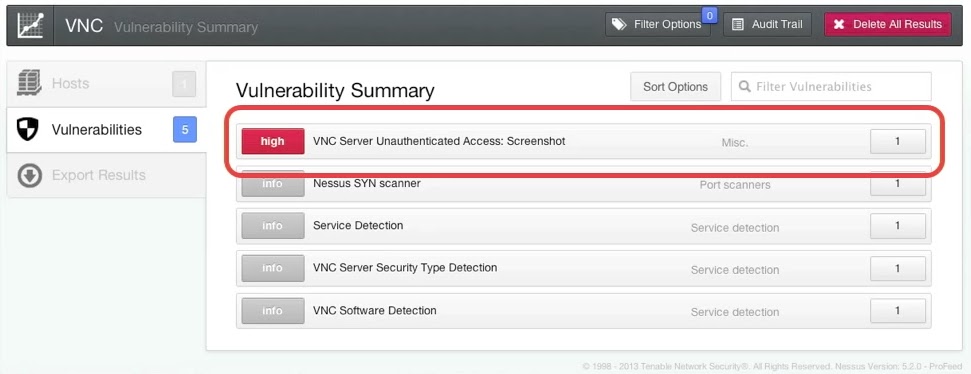
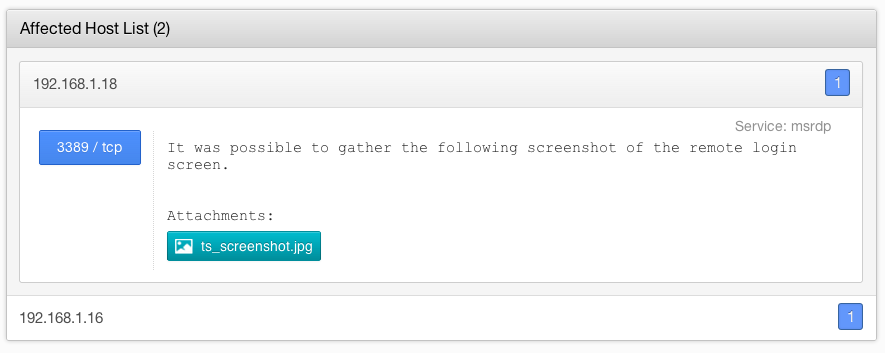
    Information collected during the scan can now be included in the results as an attachment. The first iteration of attachments will be screenshots, but any attachment type can be included.


    Remote Desktop Protocol (RDP)


    If Nessus discovers Remote Desktop Protocol on a target, a screenshot is taken. This can reveal information such as the operating system version and the currently-logged-on user.


    VNC


    If Nessus discovers a target is running VNC without a password to restrict access, a screenshot is included in the results. The above example shows the system using a web browser to visit the www.tenable.com website.


    Websites


    For Internet-connected web servers, Nessus will take a screenshot of the website as if you visited the website using a web browser. This feature is useful to identify the applications you are testing, including making sure you are testing the correct virtual host.


    Mac OS X Preference Pane


    The addition of a Nessus server preference pane in OS X allows the user to stop and start the Nessus server process and configure whether or not Nessus is started at boot time.

    Getting Nessus 5.2


    New users may download and evaluate Nessus free of charge by visiting the Nessus home page. Current customers can download 5.2 from the Tenable Support Portal. Detailed instructions and notes on upgrading are located in the Nessus 5.2 Installation and Configuration Guide.

    Nessus ProfessionalFeed and Perimeter Service customers: Please contact Tenable Support (support -at- tenable.com) with any questions regarding the upgrade to Nessus 5.2.0. Users may also visit the Tenable Discussion Portal for more information.