Showing posts with label Vulnerability Scanner. Show all posts

Monday, 13 January 2014

[WebSploit Framework] Scan And Analysis Remote System From Vulnerability


WebSploit Is An Open Source Project For Scan And Analysis Remote System From Vulnerability.

WebSploit Is An Open Source Project For :
[>]Social Engineering Works
[>]Scan,Crawler & Analysis Web
[>]Automatic Exploiter
[>]Support Network Attacks

[+]Autopwn - Used From Metasploit For Scan and Exploit Target Service
[+]wmap - Scan,Crawler Target Used From Metasploit wmap plugin
[+]format infector - inject reverse & bind payload into file format
[+]phpmyadmin Scanner
[+]LFI Bypasser
[+]Apache Users Scanner
[+]Dir Bruter
[+]admin finder
[+]MLITM Attack - Man Left In The Middle, XSS Phishing Attacks
[+]MITM - Man In The Middle Attack
[+]Java Applet Attack
[+]MFOD Attack Vector
[+]USB Infection Attack
[+]ARP Dos Attack
[+]Web Killer Attack
[+]Fake Update Attack
[+]Fake Access point Attack
[+]Wifi Honeypot
[+]Wifi Jammer
[+]Wifi Dos
[+]Bluetooth POD Attack

Tuesday, 31 December 2013

[flunym0us] Vulnerability Scanner for Wordpress and Moodle


Flunym0us is a Vulnerability Scanner for Wordpress and Moodle designed by Flu Project Team.

Flunym0us has been developed in Python. Flunym0us performs dictionary attacks against Web sites. By default, Flunym0us includes a dictionary for Wordpress and other for Moodle.

Operation

Flunym0us requires python.
Arguments allowed:
-h, --help: Show this help message and exit
-wp, --wordpress: Scan WordPress site
-mo, --moodle: Scan Moodle site
-H HOST, --host HOST: Website to be scanned
-w WORDLIST, --wordlist WORDLIST: Path to the wordlist to use
-t TIMEOUT, --timeout TIMEOUT: Connection timeout
-r RETRIES, --retries RETRIES: Connection retries
-p PROCESS, --process PROCESS: Number of process to use
-T THREADS, --threads THREADS: Number of threads (per process) to use

Versions

Flunym0us is distributed under the terms of GPLv3 license
ChangeLog 1.0:
[+] Search Wordpress Plugins
[+] Search Moodle Extensions
ChangeLog 2.0:
[+] http user-agent hijacking
[+] http referer hijacking
[+] Search Wordpress Version
[+] Search Wordpress Latest Version
[+] Search Version of Wordpress Plugins
[+] Search Latest Version of Wordpress Plugins
[+] Search Path Disclosure Vulnerabilities
[+] Search Wordpress Authors  

Wednesday, 4 December 2013

[Wapiti 2.3.0] Web Application Vulnerability Scanner

Wapiti allows you to audit the security of your web applications.

It performs "black-box" scans, i.e. it does not study the source code of the application but will scans the webpages of the deployed webapp, looking for scripts and forms where it can inject data.

Once it gets this list, Wapiti acts like a fuzzer, injecting payloads to see if a script is vulnerable.


Wapiti can detect the following vulnerabilities :
  • File disclosure (Local and remote include/require, fopen, readfile...)
  • Database Injection (PHP/JSP/ASP SQL Injections and XPath Injections)
  • XSS (Cross Site Scripting) injection (reflected and permanent)
  • Command Execution detection (eval(), system(), passtru()...)
  • CRLF Injection (HTTP Response Splitting, session fixation...)
  • XXE (XmleXternal Entity) injection
  • Use of know potentially dangerous files (thanks to the Nikto database)
  • Weak .htaccess configurations that can be bypassed
  • Presence of backup files giving sensitive information (source code disclosure)
Wapiti supports both GET and POST HTTP methods for attacks.
It also supports multipart and can inject payloads in filenames (upload).
Display a warning when an anomaly is found (for example 500 errors and timeouts)
Makes the difference beetween permanent and reflected XSS vulnerabilities.

General features :
  • Generates vulnerability reports in various formats (HTML, XML, JSON, TXT...)
  • Can suspend and resume a scan or an attack
  • Can give you colors in the terminal to highlight vulnerabilities
  • Different levels of verbosity
  • Fast and easy way to activate/deactivate attack modules
  • Adding a payload can be as easy as adding a line to a text file
Browsing features

  • Support HTTP and HTTPS proxies
  • Authentication via several methods : Basic, Digest, Kerberos or NTLM
  • Ability to restrain the scope of the scan (domain, folder, webpage)
  • Automatic removal of a parameter in URLs
  • Safeguards against scan endless-loops (max number of values for a parameter)
  • Possibility to set the first URLs to explore (even if not in scope)
  • Can exclude some URLs of the scan and attacks (eg: logout URL)
  • Import of cookies (get them with the wapiti-cookie and wapiti-getcookie tools)
  • Can activate / deactivate SSL certificates verification
  • Extract URLs from Flash SWF files
  • Try to extract URLs from javascript (very basic JS interpreter)
  • HTML5 aware (understand recent HTML tags)
  • Wapiti is a command-line application.

    Here is an exemple of output against a vulnerable web application.
    You may find some useful informations in the README and the INSTALL files.

    Tuesday, 20 August 2013

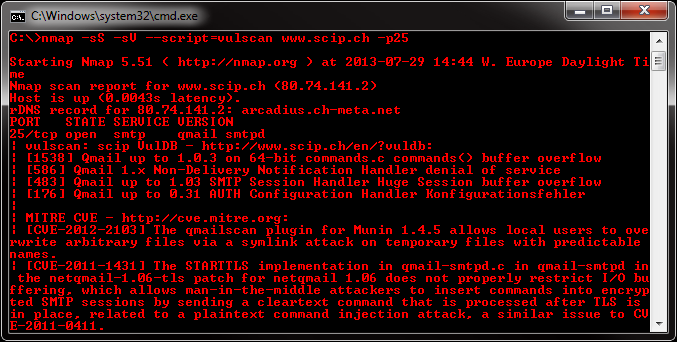
    [Vulscan] Module which enhances nmap to a vulnerability scanner


    Vulscan is a module which enhances nmap to a vulnerability scanner. The nmap option -sV enables version detection per service which is used to determine potential flaws according to the identified product. The data is looked up in an offline version scip VulDB.


    Installation

    Please install the files into the following folder of your Nmap installation:


    Nmap\scripts\vulscan\*


    Usage

    You have to run the following minimal command to initiate a simple vulnerability scan:

    nmap -sV --script=vulscan/vulscan.nse www.example.com


    Vulnerability Database

    There are the following pre-installed databases available at the moment:

    * scipvuldb.csv | http://www.scip.ch/en/?vuldb
    * cve.csv | http://cve.mitre.org
    * osvdb.csv | http://www.osvdb.org
    * securityfocus.csv | http://www.securityfocus.com/bid/
    * securitytracker.csv | http://www.securitytracker.com
    * xforce.csv | http://xforce.iss.net
    * expliotdb.csv | http://www.exploit-db.com
    * openvas.csv | http://www.openvas.org

    Single Database Mode

    You may execute vulscan with the following argument to use a single database:

    --script-args vulscandb=your_own_database


    It is also possible to create and reference your own databases. This requires to create a database file, which has the following structure:

    <id>;<title>


    Just execute vulscan like you would by refering to one of the pre-delivered databases. Feel free to share your own database and vulnerability connection with me, to add it to the official repository.