Saturday, 12 October 2013

[Firebind Reflector v0.53] Portable Network Path Scanning Tool


Firebind Reflector is a portable network path scanning tool that can profile firewall and other network device rules for port blocking, such as perform egresss/exfiltration testing. Reflector has a client side and listener (server-side) like Netcat and Ncat, except Reflector can dynamically be told by the client to listen on any or all 65,535 TCP or UDP ports, while supporting up to several hundred simultaneous client scans.


  • All components of Reflector (server-side and client-side) are contained within a single 3 megabyte Java jar file. The Reflector jar file contains the core Firebind codebase, a fully functional web server, and both Reflector Java applet and command line clients.
  • Reflector’s Java applet is automatically downloaded to the client machine, requiring no user installation other than allowing it to run within the browser. Since it is browser-based, any user no matter how non-technical they may be can run a test.
  • Reflector’s patent pending technology (System and Method for Network Path Validation – US 20130185428) allows Reflector to dynamically listen on any UDP or TCP port, while never exceeding operating system limits that restrict the maximum number of listeners (which can be as low as several hundred at a time out of 65,535 possible ports for either TCP or UDP.)
  • Reflector’s out-of-band command channel allows all clients to keep in sync with the Reflector server component regardless of whether the given port under test is blocked or not, giving Reflector 100% accuracy in results. Other client-only solutions can’t guarantee that the packets they receive back are coming from the device they are trying to profile or test. The out-of-band command channel also allows a single instance of Reflector to handle hundreds of simultaneous clients, all performing full 64k TCP and/or UDP port tests. Finally, the out-of-band command channel increases the speed of the tests since the client can be configured to wait any number of seconds for a reply, and if that timer expires, the client can issue a “skip” command to Reflector to tell it to move to the next port.
  • Reflector does more than simple TCP handshake connection attempts by sending a custom payload over every port and checking to confirm the payload echoed back from the server matches or not.
  • Reflector’s built-in database and RESTful API allow test results to be viewed via a web page or accessed by third-party applications. This removes the burden from the client-side user to e-mail their results.

[WiFi Password Dump] Command-line Tool to Recover Wireless Passwords


WiFi Password Dump is the free command-line tool to quickly recover all the Wireless account passwords stored on your system.

It automatically recovers all type of Wireless Keys/Passwords (WEP/WPA/WPA2 etc) stored by Windows Wireless Configuration Manager.

For each recovered WiFi account, it displays following information
  • WiFi Name (SSID)
  • Security Settings (WEP-64/WEP-128/WPA2/AES/TKIP)
  • Password Type
  • Password in Hex format
  • Password in clear text
Being command-line tool makes it useful for penetration testers and forensic investigators. For GUI version check out the Wi-Fi Password Decryptor.


[Mutator v0.2.2.1] Wordlist mutator


This project aims to be a wordlist mutator with hormones, which means that some
mutations will be applied to the result of the ones that have been already done,
resulting in something like:


corporation -> C0rp0r4t10n_2012

This software is usefull when applied to a few words, like company name and/or
domain name targeted or the usernames of the system administrators. You must
think that the number of wrds resulting of applying all mutations is exponential
: a 1 word input would generate an output of 1200 words; a 4 words input would
generate an output of 4800 words.

The actual mutations supported are:
* Case mutations (toUpper, toLower, FirstCharUpper, SwapCase)
* T0 l33t mutation
* Add Special Char mutation
* Append String of a predefined list
* Append Date

Some mutations are strange, and some of them have no sense applied together,
like *_strings and add_year, but is your decision, for that exists the
parameters xDDD

The mutations "prepend_string" is commented becouse IMHO have no sense xD and
is rare find passwords like this but feel free to uncommented it, and don't
forget uncomment it in mutator.h too

Syntax: mutator [options] wordlist

Options:
-v, --version       Show version information
-h, --help         Show this help
-o, --output [file] File to write the results
-f, --file [file]* File from read the words
-w, --word [word]* Word to mutate
-b, --basic         Only "case" and "l33t" mutations
-a, --advanced     Only advanced mutations
-y, --years=[year] No append,prepend year, if a year is specified appendrange between year specified and actual year, you can specified a range as well [year-year]
-x, --specials     No append specials chars
-s, --strings       No append,prepend hardcoded strings

One of these options -w or -f is required

Use Case:

$ ./mutator -w company -o company.dic

$ for i in $(cat user.dic);do ./mutator -w $i -o $i.dic; done

[Browser Password Decryptor v5.5] Software to instantly recover website login passwords stored by popular web browsers


Browser Password Decryptor is the FREE software to instantly recover website login passwords stored by popular web browsers.

Currently it can recover saved login passwords from following browsers.
  • Firefox
  • Internet Explorer
  • Google Chrome
  • Google Chrome Canary/SXS
  • CoolNovo Browser
  • Opera Browser
  • Apple Safari
  • Comodo Dragon Browser
  • SeaMonkey Browser
  • Flock Browser
For command-line version, check out our new tool - Browser Password Dump.

Features:
  • Instantly decrypt and recover stored encrypted passwords from popular web browsers.

  • Right Click Context Menu to quickly copy the password

  • Recover password of any length and complexity.

  • Automatically discovers all supported Applications and recovers all the stored passwords.

  • Sort feature to arrange the recovered passwords in various order to make it easier to search through 100's of entries.

  • Save the recovered password list to HTML/XML/Text file

  • Easier and faster to use with its enhanced user friendly GUI interface.

  • Support for local Installation and uninstallation of the software.
  

[LinEnum v0.2] Automating local information gathering tasks on Linux hosts


LinEnum is a shell script that automates local information gathering tasks on Linux hosts.Over 65 checks are performed, obtaining anything from kernel information to locating possible escalation points such as potentially useful SUID/GUID files and Sudo/rhost mis-configurations etc.

Additionally, the script will also use a provided keyword to search through *.conf and *.log files. Any matches will be displayed along with the full file path and line number on which the keyword was identified (useful for finding ‘password’ and other sensitive data).


High-level summary of the checks/tasks performed by LinEnum:
  • Kernel and distribution release details
  • System Information:
    • Hostname
    • Networking details:
    • Current IP
    • Default route details
    • DNS server information
  • User Information:
    • Current user details
    • Last logged on users
    • List all users including uid/gid information
    • List root accounts
    • Checks if password hashes are stored in /etc/passwd
    • Extract full details for ‘default’ uid’s such as 0, 1000, 1001 etc
    • Attempt to read restricted files i.e. /etc/shadow
    • List current users history files (i.e .bash_history, .nano_history etc.)
    • Basic SSH checks
  • Privileged access:
    • Determine if /etc/sudoers is accessible
    • Determine if the current user has Sudo access without a password
    • Are known ‘good’ breakout binaries available via Sudo (i.e. nmap, vim etc.)
    • Is root’s home directory accessible
    • List permissions for /home/
  • Environmental:
    • Display current $PATH
  • Jobs/Tasks:
    • List all cron jobs
    • Locate all world-writable cron jobs
    • Locate cron jobs owned by other users of the system
  • Services:
    • List network connections (TCP & UDP)
    • List running processes
    • Lookup and list process binaries and associated permissions
    • List inetd.conf/xined.conf contents and associated binary file permissions
    • List init.d binary permissions
  • Version Information (of the following):
    • Sudo
    • MYSQL
    • Postgres
    • Apache
    • Checks user config
  • Default/Weak Credentials:
    • Checks for default/weak Postgres accounts
    • Checks for default/weak MYSQL accounts
  • Searches:
    • Locate all SUID/GUID files
    • Locate all world-writable SUID/GUID files
    • Locate all SUID/GUID files owned by root
    • Locate ‘interesting’ SUID/GUID files (i.e. nmap, vim etc)
    • List all world-writable files
    • Find/list all accessible *.plan files and display contents
    • Find/list all accesible *.rhosts files and display contents
    • Show NFS server details
    • Locate *.conf and *.log files containing keyword supplied at script runtime
    • List all *.conf files located in /etc
    • Locate mail

[Dumpper v.30.2] Gestor de redes wireless

Dumpper es un gestor de redes wireless con el que podemos conectarnos a nuestra red, entre otras cosas.

Abrimos el programa, le damos a "Escanear" y saldran en pantalla las redes disponibles, seleccionamos la nuestra e introducimos la clave en la casilla "Key", luego le damos a "Conectar" y listo.

Tambien he puesto una funcion que muestra las claves por defecto de las redes WLAN_XXXX y JAZZTEL_XX con macs compatibles.


También he incluido un gestor de perfiles con el que podemos añadir, eliminar o conectar a los pefiles que queramos. Seleccionamos la red y le damos al boton "Añadir a perfiles". Se abrira automaticamente la pestaña "Perfiles" donde podemos ver los detalles de los perfil creados, los parametros locales de la conexion de red, la calidad del enlace, etc. He incluido una opcion por si se quiere meter la clave en Ascii en vez de en hexadecimal, hay que marcar la casilla que hay al lado de "Key" si es el caso.


Y bueno, los botones de Guardar, Eliminar y Activar esta bastante claro para que son, no creo que haga falta explicarlo..

--------------------------------------------------------------------

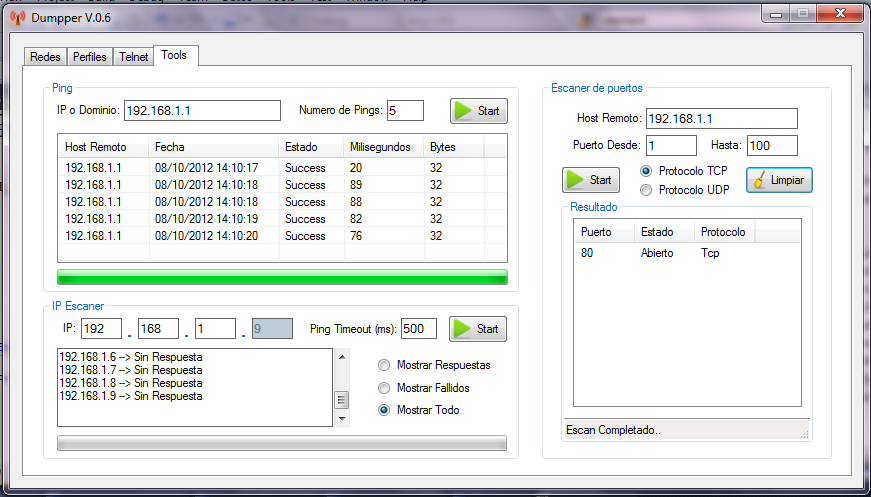
Añadida una nueva pestaña llamada "Tools" que incluye un apartado para hacer ping a la ip o al host especificado, otro apartado para escanear los puertos que tenemos abiertos y otro el apartado es un escaner de ips.


[Sandy v0.1] Open-source Samsung phone encryption assessment framework


Sandy is an open-source Samsung phone encryption assessment framework. Sandy has different modules that allow you to carry out different attack scenarios against encrypted Samsung phones. For the details check our Derbycon 3.0 presentation (What’s common in Oracle and Samsung? They tried to think differently about crypto).

Requirements

  • It was developed with python 2.7.
  • Most of the modules works on OSX.
  • Every modules should work on Kali Linux.
  • You need pexpect, pbkdf2 and pyCrypto pyhton modules.